This TanukiBeats release is about where your music lives. It is not just local folders and iCloud anymore — you can sign into cloud drives directly, keep NAS imports, and play everything from one library.
Download TanukiBeats on the App StoreNew here? Read the TanukiBeats overview first. Homelab or Synology user? NAS SMB/WebDAV guide.
Cloud drive import#
Under Import Music, alongside local folders and Wi‑Fi transfer, you can now sign in to:
- Dropbox
- Google Drive
- OneDrive
Pick a music folder in the cloud and TanukiBeats scans and imports automatically — no need to download everything to the phone first.
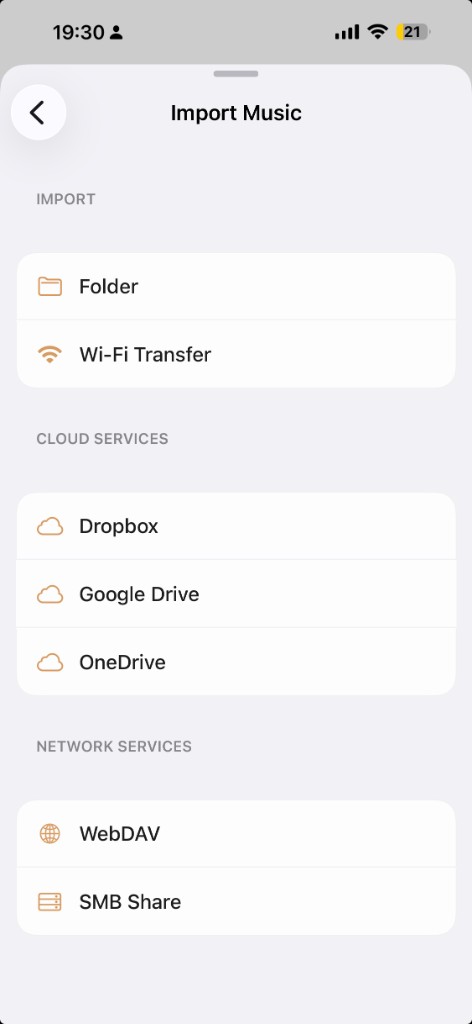
WebDAV and SMB Share are still on the same screen for homelab and NAS libraries.
Library experience#
Your library now treats local, cloud, and NAS sources the same way: one set of artists, albums, and playlists — not a file-browser detour.
After you connect a cloud account, the app jumps to account management so you can review linked services, change folders, or disconnect.
Easier Wi‑Fi transfer#
Sending tracks from a desktop is simpler: open Settings → Library → Wi‑Fi Transfer instead of hunting through extra menus.
Help and guides#
- New Help & Tips FAQ for import, sync, and permission questions
- User Guide import steps filled in (including Chinese localization in the app)
UI polish#
- Fixed transparency slider mapping for smoother appearance controls
- Updated About copy and support contact details
One line summary: your files may sit on disk, in the cloud, or on a NAS — TanukiBeats pulls them into the same offline library.
Download TanukiBeats on the App Store