Music rarely stays in one room. You may start an album on your iPhone while making coffee, then settle in with an iPad when the evening slows down. The awkward part has always been the handoff: find the album again, find the track again, and drag the progress bar back to where you were.
TanukiBeats 6.0.225 is built around a simpler idea — the music should move with you.
Download TanukiBeats on the App Store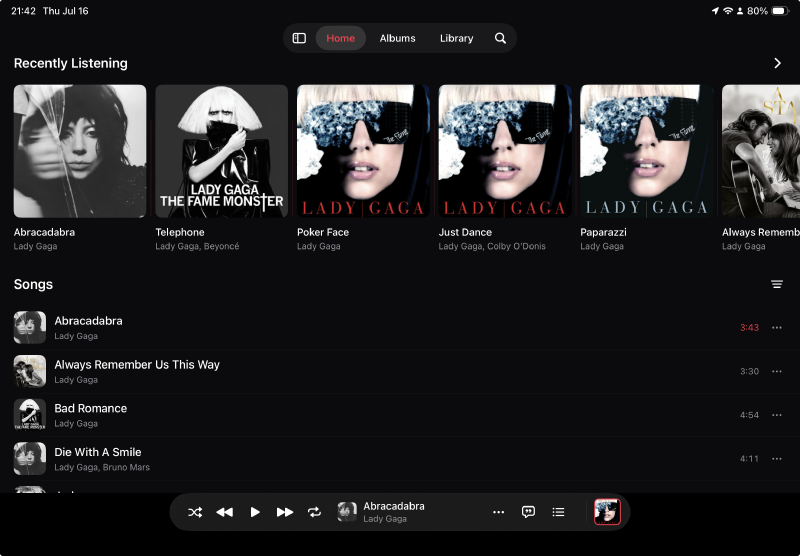
Cross-device Continuity, one tap away#
On iPad, the Mini Player runs along the bottom of the screen. At its far right is the playback continuity button. Tap it when you want to move the current session between iPhone and iPad, and the other device can continue from the same moment.
It is a small control, but it changes the rhythm of using a music app. There is no need to treat each device as a separate player with a separate listening session. The album, track, and position stay part of the same experience.
The iPad finally has room to be an iPad#
The larger screen is not just a stretched phone interface. TanukiBeats now gives browsing and playback enough room to sit together: recently played music across the top, the library below, and the Mini Player always within reach.
That matters most with a large collection. You can keep the current track visible while moving through albums and songs, instead of repeatedly switching between a full-screen player and the library.
One library, wherever the files live#
The layout is only half the story. TanukiBeats brings local files, iCloud Drive, NAS folders, and cloud drives into the same library. A track can be cached with a tap, while storage remains manageable from one place.
Cloud and NAS selection now follows the same pattern too: include the folders and tracks you want, leave out the ones you do not, and return later without learning a different workflow for every source.
If your collection lives on a home server, see the NAS guide. For Dropbox, Google Drive, and OneDrive, read the cloud import story.
Still a music player first#
The new continuity features sit on top of the things that make TanukiBeats useful every day: native FLAC playback, synchronized lyrics, AirPlay, background playback, and an offline-first library.
Local folders, iCloud Drive, SMB/WebDAV, and Wi‑Fi transfer remain available without Tanuki VIP. VIP adds cloud drives, library sync, cross-device continuity, and CarPlay for people who want the same library to travel further.
Two months of Tanuki VIP, on us#
This release is a good moment to try the full experience. The current launch offer gives eligible new, existing, and returning subscribers two months of Tanuki VIP free. Apple handles the redemption and shows the complete terms before you confirm.
After the free period, VIP Monthly renews automatically at the standard monthly price unless canceled. You can manage or cancel the subscription from your Apple account settings.
Redeem two free months of Tanuki VIPThe best device for music is often whichever one is already in your hand. TanukiBeats 6.0.225 makes changing that device feel less like stopping and starting — and more like simply continuing the song.