
Some updates fit neatly into a list of new features. Others are better described as a slow process of getting closer to the experience we had in mind.
We have been refining the TanukiBeats Now Playing screen again. It did not suddenly become a completely different player. Instead, it gradually found its shape through real listening sessions and many moments of thinking, “This could still feel better.”
Download TanukiBeats on the App StoreLet the music remain at the center#
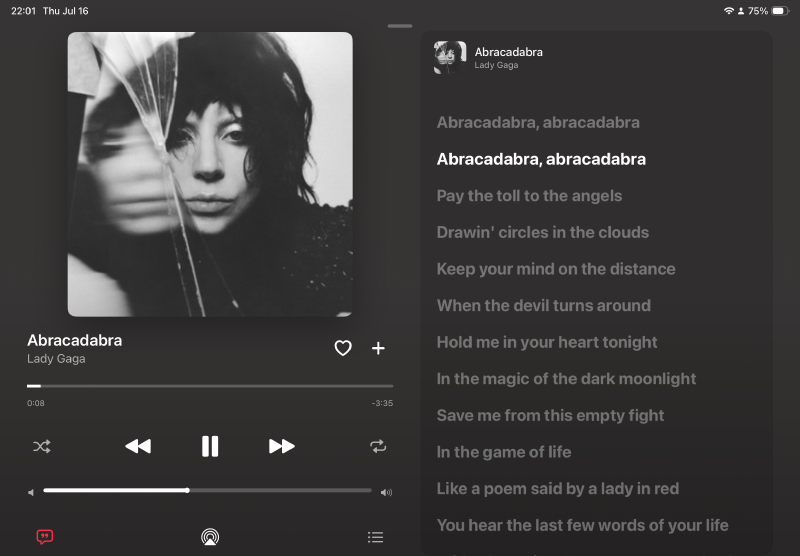
The first thing you notice on the refined iPad player is still the album artwork.
We tried smaller artwork and layouts that placed more information on screen. After listening to a few albums, however, the player started to feel more like a control panel than a place for music. The artwork, the song, and the moment of listening deserved the visual focus.
The left side now gives the cover enough room to breathe. Track information, favorite, progress, and playback controls remain easy to reach without competing for attention. Colors from the current release settle naturally into the background, helping the screen feel like an extension of the music.
Lyrics that move with the song#
The synchronized lyrics on the right went through just as many revisions.
The current line needs to be unmistakable, while the surrounding lyrics should remain available as context. Type size has to work from a comfortable viewing distance, and the scrolling should never feel as if the screen is chasing the music.
After many adjustments to brightness, spacing, and position, the active line now rises naturally from the page while everything else stays quietly in place. You do not have to stare at the display, but when you look up, the right words are waiting.
The queue stays inside the listening experience#
The right side can switch from lyrics to the playback queue. The current track, upcoming songs, shuffle, and repeat controls are visible without disturbing the player on the left.
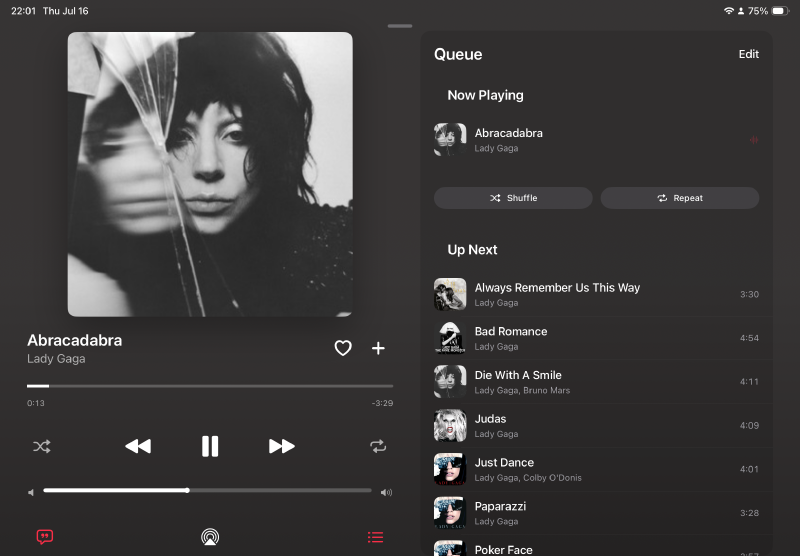
It may look like a straightforward layout, but it took many small decisions: how many tracks should remain visible, how large each thumbnail should be, where durations belong, and how controls can stay useful without becoming the loudest part of the screen.
Some versions looked impressive at first and felt crowded after an album. Others were clean but lost some of the atmosphere that makes listening enjoyable. So we kept changing things, then kept listening.
The happiest moment is not “finished”#
Independent development rarely has one clear moment when something is permanently complete.
More often, we adjust a gap and listen to a few songs. We change a proportion and open the player again the next day. When something still feels awkward, we try another version.
Then, during a familiar album, there is a small moment when the artwork, lyrics, and controls finally seem to sit exactly where they belong. The joy is not that we will never change the page again. It is seeing that all those experiments moved the product a little closer to what we hoped it could be.
Different screens, lyric lengths, and artwork styles will continue to reveal new details. We will keep approaching them the same way: listen carefully, look closely, and improve one thing at a time.
Try the complete Tanuki VIP experience#
Local folders, iCloud Drive, SMB/WebDAV, and Wi‑Fi transfer remain available without Tanuki VIP. VIP adds cloud drives, library sync, cross-device playback continuity, and CarPlay for listeners who want their collection to move naturally between devices.
The current offer gives eligible new, existing, and returning subscribers two months of Tanuki VIP free. Apple shows eligibility, renewal pricing, and the full terms before confirmation. The subscription can be managed or canceled at any time from Apple account settings.
Redeem two free months of Tanuki VIPIf you enjoy giving album artwork room to breathe, following a lyric now and then, and seeing what will play next without leaving the music, open TanukiBeats and take a look at what all those small experiments became.